01
Gesture-controlled cars
Using the micro:bit's accelerometer, students drive a car with hand tilts, then layer on AI-trained gesture recognition to refine the control.
The 80-min / week choice · Grades 5–8
Where students build real AI, not demos of it.
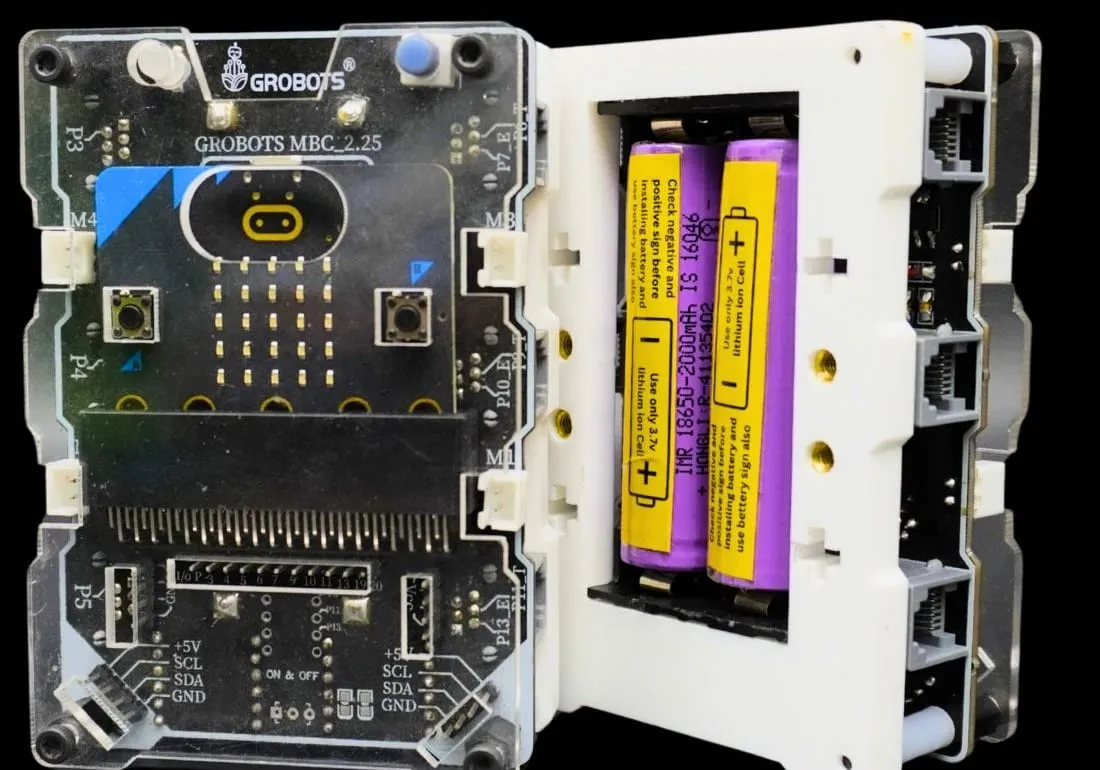
Grobots Ultima is the AI robotics kit at the top of the Grobots pathway for Grades 5–8, made for 80-minute sessions: micro:bit V2 with AI vision, a 4-motor Ultima Expansion Board and metal construction, coded in MStudio, MicroPython and MIT App Inventor.
Ultima is the destination of the pathway and the engine of the AI and Robotics Lab. It's where students move into MicroPython and machine learning: they train their own models, build gesture-controlled cars and create AI attendance systems, the kind of work that prepares them for CBSE's AI electives and competitive exhibitions.
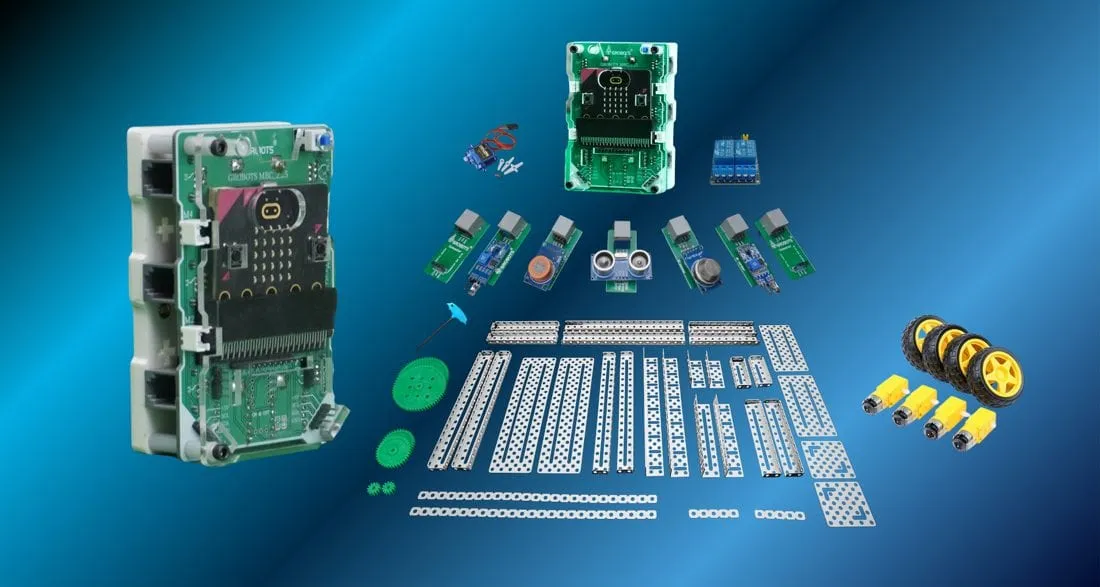
This kit comes inside a lab, not sold on its own. Ultima is the core of the Grobots AI and Robotics Lab. Your own teachers run it (School-Run Lab), or a Grobots trainer runs it on campus (Managed Lab).
See the AI and Robotics Lab →What students build
Ultima is where robotics becomes recognisably AI. These are the kinds of projects students complete, and take to competitions.
01
Using the micro:bit's accelerometer, students drive a car with hand tilts, then layer on AI-trained gesture recognition to refine the control.
02
Students train a model to recognise and log entries, turning an everyday school problem into a hands-on machine-learning project.
03
With the AI training built into MStudio and MicroPython, students train, test and deploy their own models: the genuine workflow behind applied AI.
The engine
Where the AI Lab's depth comes from.
Sample activities
20–24 sessions per grade, every year, across Grades 5–8. The coding load rises grade by grade, so the jump to text and machine learning is gradual, not a cliff. With 4 motors and metal construction, Ultima leans into mechanism-rich projects: vending machines, conveyor belts, smart irrigation.
Grade 5
MStudio
Grade 6
MStudio · Python · AI
Grade 7
MStudio · MicroPython · AI
Grade 8
MicroPython · AI · MIT App Inventor
Connectors and software
Connectors
Every sensor and motor plugs into its own RJ11 or JST port on the Ultima Expansion Board. Plugs only fit one way, so a multi-sensor, 4-motor robot can be built in one session without a tangle of jumper wires.
Software
Grade 7 blends MStudio with MicroPython and AI training; Grade 8 moves mainly to MicroPython and AI training for real machine-learning work, plus MIT App Inventor for phone-controlled builds. AI runs offline on Windows PCs, Android tablets and Raspberry Pi.
Where it fits
Ultima and Ultima Lite teach the same AI skills; Ultima is the choice when a school can give 80-minute sessions.
Grades 5–8 · 40-min / week
Ultima Lite micro:bit, sensors and AIYou are here
Grobots Ultima Grades 5–8 · 80-min / week · Full AI platformClasses 9–12
CBSE AI electives Code 417 and Code 843 (optional)The Grades 3–8 pathway builds the foundational competencies students need if they later take CBSE AI Code 417 (Classes 9–10) or Code 843 (Classes 11–12) as electives. Both are optional, not mandates.
More than the kit
20–24 sessions per grade, every year, with defined outcomes for each lesson. Four guided lessons, then every fifth session is a Challenge that doubles as the assessment.
A teacher video for every lesson, in English, Hindi and Marathi, plus a printed workbook for students.
Your teacher is trained on the full build, code and AI-training flow before Day 1.
Grobots designs and makes its kits in India. Spares and replacements come from the same team that built them.
Questions schools ask
Ultima is the choice when a school can give 80-minute weekly sessions: the projects, such as training a model, building a multi-sensor robot or debugging Python, use the full time. Schools running a single 40-minute period a week should choose Ultima Lite instead, which shares the same AI capability in a tighter format. Both suit Grades 5–8.
The Grades 3–8 Grobots pathway builds the foundational competencies students need if they take CBSE AI Code 417 in Classes 9–10 or Code 843 in Classes 11–12. Students arrive having trained models, written Python and built working AI projects. Note that 417 and 843 are optional electives, not mandatory subjects.
MStudio (built on Microsoft MakeCode), MicroPython and MIT App Inventor, plus the AI training built into MStudio. Grade 7 blends MStudio with MicroPython and AI training; Grade 8 moves mainly to MicroPython and AI training for real machine-learning work. AI models train and run on the device, so they work offline.
Yes. Ultima uses metal construction designed for repeated classroom handling. Because Grobots designs and makes its kits in India, spares and replacements come directly from the team that built them, not from an importer, so a broken part doesn't stop a section's lessons for weeks.
No. Ultima comes as the core of the Grobots AI and Robotics Lab, with the curriculum, onsite teacher training, the Virtual Master Trainer and support. Tell us your grades and timetable, and we'll send a proposal that maps the right kits to each grade.
Ultima is the core of the Grobots AI and Robotics Lab, supplied with the curriculum, training and the Virtual Master Trainer. Tell us your grades for a proposal within 24 hours.