
01
Code that controls motion
Students design a game-controller-style build, then program motors and outputs to respond: the first time their code visibly changes the physical world.
Grades 3–5 · First coding step
Real coding confidence, with zero wiring anxiety.
Grobots Primo is the Grades 3–5 coding kit in the Grobots pathway: students build a model, plug it in with RJ11 connectors only, and code it to move in Groblox (Grades 3–4) and MStudio (Grade 5).
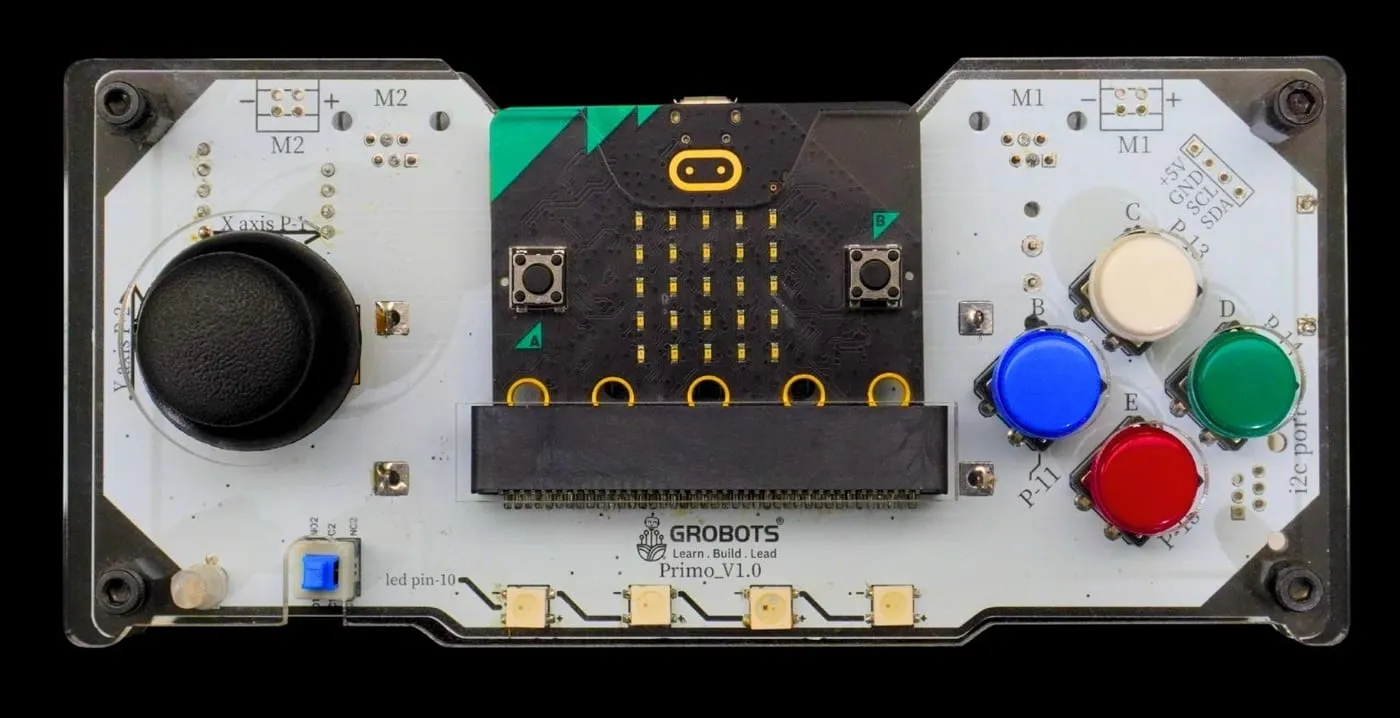
Primo is where students first make something they built move on command. It is built on a micro:bit V2 housed safely inside the Primo Explorer board, with no exposed pins and RJ11 plug-and-play only. With a joystick, buttons, an RGB LED, a buzzer, a 2-motor driver and a clip-on piano/touch board, students build a model, plug it in and code it. Standalone, it runs a 40-minute coding period from Grade 3; paired with the Junior Construction Kit, it fills an 80-minute session.
This kit comes inside a lab, not sold on its own. Primo comes inside a Grobots lab with the rest of the pathway. Your own teachers run it (School-Run Lab), or a Grobots trainer runs it on campus (Managed Lab).
See the labs →What it builds
Primo turns the mechanical intuition built in Grade 3 into the first taste of programming, without overwhelming young students with hardware.
01
Students design a game-controller-style build, then program motors and outputs to respond: the first time their code visibly changes the physical world.
02
Groblox and MStudio introduce sequencing, loops and events in a drag-and-drop form that's age-appropriate but carries straight over to text code later.
03
RJ11-only connections mean no shorted boards, no loose jumpers and no class derailed by a wiring fault, so the lesson stays on coding, not troubleshooting.
Connectors and software
Connectors
RJ11 is the simple clip-in connector used by landline phones. Components plug in one way and click into place: no bare wires, no breadboards and nothing to wire incorrectly. The micro:bit V2 sits inside the Primo Explorer board, so there are no exposed pins to short.
Software
Both are block-based and teach the same core logic (sequence, loop, event) that students later carry into Python on Ultima Lite and Ultima. The software runs on Windows PCs, Android tablets and Raspberry Pi.
Where it fits
Primo takes the mechanical builds from Junior Construction and adds code. From Grade 5, Ultima Lite adds sensors, more motors and AI.
Grade 3
Junior Construction MechanicalYou are here
Grobots Primo Grades 3–5 · First codingGrades 5–8 · 40-min / week
Ultima Lite micro:bit, sensors and AIMore than the kit
20–24 sessions per grade, every year, with defined outcomes for each lesson. Four guided lessons, then every fifth session is a Challenge that doubles as the assessment.
A teacher video for every lesson, in English, Hindi and Marathi, plus a printed workbook for students.
Your existing ICT teacher is trained on the full build-and-code flow.
Grobots designs and makes its kits in India. Spares and replacements come from the same team that built them.
Questions schools ask
RJ11 is the simple clip-in connector used by landline phones. Components plug in one way and click into place, with no bare wires, no breadboards and nothing to wire incorrectly. It removes the single biggest source of frustration and breakage in primary-grade robotics, so a Grade 3 class spends its period coding rather than fixing loose connections.
Groblox in Grades 3–4 and MStudio in Grade 5. Groblox is built on Scratch for Grobots kits, and MStudio is built on Microsoft MakeCode. Both are block-based, run on Windows PCs, Android tablets and Raspberry Pi, and teach the same core logic (sequence, loop, event) that students later carry into Python on Ultima Lite and Ultima.
Yes. Like Junior Construction, every Primo activity is timed for a standard 40-minute ICT period including setup and clean-up, so it fits the normal timetable. Schools that give 80-minute sessions pair Primo with the Junior Construction Kit, building the mechanism first and coding it in the same session.
No. Primo comes as part of a complete Grobots lab, with the curriculum, onsite teacher training, the Virtual Master Trainer and support. Tell us your grades and timetable in a proposal request, and we'll configure the right mix of kits across the pathway for your school.
Primo comes as part of a complete Grobots lab, with the curriculum, teacher training and the Virtual Master Trainer. Tell us your grades for a proposal within 24 hours.