
Zone 1
Robotics and Coding
The structured robotics core, built on the Grobots kit pathway.
- Grobots Primo and Ultima kits
- micro:bit V2 and sensors
- MStudio and MicroPython
- Line-followers and gesture cars
STEM Lab · Grades 6–10 · ATL and PM SHRI ready
The Grobots STEM Lab is a single maker space with four zones: Robotics and Coding, Electronics and IoT, Fabrication and 3D, and Innovation and Design. It is built to fit Atal Tinkering Lab and PM SHRI funding, with a curriculum aligned to NEP 2020 and NCF-SE 2023 and a video for every project.
What it is
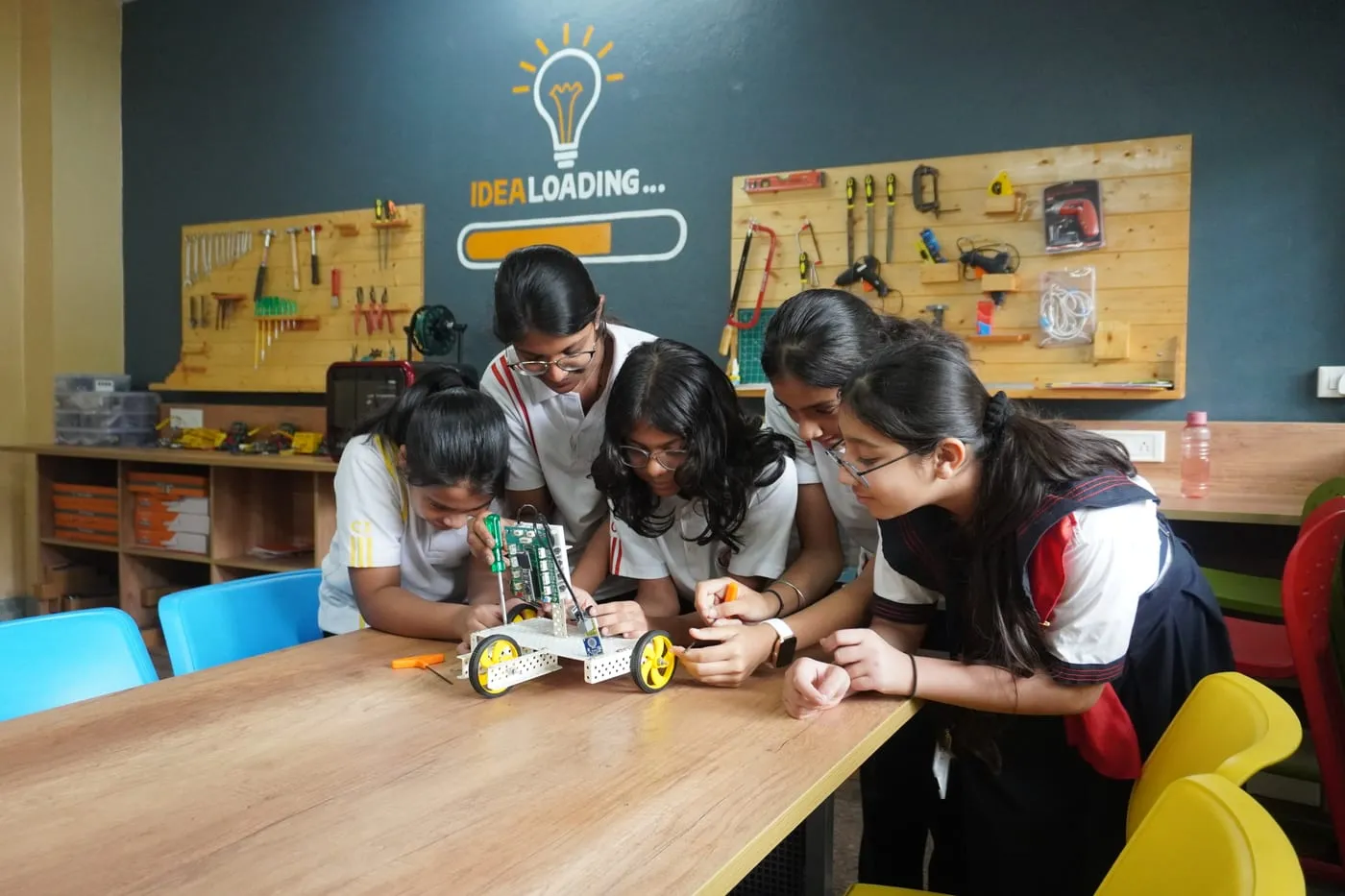
A STEM Lab shouldn't be a room full of disconnected gadgets. The Grobots STEM Lab is one space where robotics, electronics, fabrication and design thinking work together, with a curriculum behind every bench.
It is our broadest lab: a flexible innovation and tinkering space for Grades 6 to 10, extendable to 12. Where the AI and Robotics Lab goes deep on one discipline, the STEM Lab goes wide.
It is built for schools setting up an Atal Tinkering Lab or upgrading under PM SHRI, with the curriculum, training and VMT support that keep it running past Year 1, when many tinkering labs go quiet.
The STEM Lab at a glance
The team behind Grobots: 12+ years in school robotics and tinkering, 300+ private schools, 1,500+ government schools.
Inside the lab
Each zone is a self-contained learning area with its own equipment and projects, but they share one progression, so a single teacher can run the whole lab.
Zone 1
The structured robotics core, built on the Grobots kit pathway.
Zone 2
From first circuit to connected device: the language of modern hardware.
Zone 3
Where ideas become physical objects students can hold.
Zone 4
Open-ended problem solving: the heart of the tinkering-lab idea.
Exact equipment per zone is shaped to your grade range, budget and ATL grant, and confirmed in your proposal. Furniture, IT and advanced equipment are optional modules. See the kits used in Zone 1.
Funding fit
The Atal Tinkering Lab grant from the Atal Innovation Mission (AIM), NITI Aayog, is paid to the school over five years under two heads: a one-time establishment head and an operational head. The Grobots STEM Lab is structured so the equipment, curriculum and training map to those heads, and so the lab keeps delivering after the grant is spent.
Head 1
The one-time cost of setting up the lab.
Head 2
The cost of running the lab, paid over five years.
ATL sanction is granted by AIM directly to the school; Grobots supplies the lab, curriculum and training. Eligible schools can also fund a STEM Lab through PM SHRI or CSR. For government schools, see Government and ATL.
Robotics, electronics, IoT, 3D fabrication and innovation tools, chosen to match the ATL equipment framework.
Structured projects for every grade, so the lab is taught, not just stocked.
Onsite onboarding plus step-by-step video for every project, in English, Hindi and Marathi.
Help structuring the proposal and usage records to match AIM expectations.
How it aligns
The tinkering-lab idea is about outcomes, not just equipment. Here is how the Grobots STEM Lab delivers against each objective.
| Objective (ATL / NEP 2020) | How the Grobots STEM Lab delivers it |
|---|---|
| Foster curiosity, creativity and imagination | An open Innovation and Design zone with design-thinking challenges and a free project bench |
| Build design thinking, computational thinking and physical computing | Robotics and Coding zone with MStudio and MicroPython; Electronics and IoT zone for physical computing |
| Hands-on, experiential, project-based learning (NEP 2020) | Grade-wise projects across all four zones: every concept is built, not just read |
| Exposure to modern tools: 3D printing, electronics, IoT, robotics | Dedicated Fabrication and 3D and Electronics and IoT zones with current, school-safe equipment |
| Sustained use, not a one-time setup | Curriculum, teacher training and VMT video support designed to keep the lab running for years |
| Access regardless of teacher background | Virtual Master Trainer guidance in English, Hindi and Marathi; no specialist hire required |
Will it actually run?
Many ATL and STEM labs are well funded and well stocked, then sit unused by Year 2 because nobody could teach them. Grobots is built around that exact failure point.
Video
The Virtual Master Trainer walks teacher and students through each project step by step, so an existing teacher can run an advanced STEM lab.
Language
Built for how Indian schools actually teach, not a translated afterthought.
Space
A STEM Lab can be set up in an existing computer room or a spare classroom. Furniture and dedicated IT are optional modules.
Year 2 and beyond
Year 1 support is included, with an optional maintenance plan from Year 2. Schools add Grobots branch after branch because the labs keep working.
ATL implementation · Gujarat
Amrit Vidyalay set up its Atal Tinkering Lab with Grobots equipment and curriculum. Grade-wise projects and Virtual Master Trainer videos meant the lab ran on the school's own teachers from day one, the single biggest factor in whether an ATL succeeds or stalls.
Read the Amrit Vidyalay story →ATL experience of the team behind Grobots
Atal Tinkering Labs in 36 Andhra Pradesh residential welfare schools and 24 Arunachal Pradesh state schools.
Modular and grant-friendly
You include only the modules your school needs. Every proposal is itemised and priced for your school, with optional modules clearly separated, so you decide what goes in and when.
| Module | Status | What it covers |
|---|---|---|
| Grobots core programme | Core | Robotics and Coding zone, grade-wise curriculum, teacher training, VMT access, Year 1 support |
| Electronics, IoT and Fabrication zones | Optional | Electronics and IoT kits, 3D printer, design software and mechanical tools, added zone by zone |
| Innovation zone: drones and project bench | Optional | Drone kit, design-thinking resources and open-project equipment |
| Furniture, lab branding and IT | Optional | Lab furniture, signage and computers. Skip them if you have an existing computer room. |
A STEM Lab can run as a School-Run Lab with your teachers or as a Managed Lab with a Grobots trainer. Compare the labs.
How we set it up
We map your grade range, space, ATL or PM SHRI funding status and the zones that matter most, then send an itemised proposal.
Order confirmation, grant-aligned documentation, and equipment dispatch across the selected zones.
Onsite setup of every zone, equipment testing, and VMT access for your teachers.
Onsite teacher onboarding, a curriculum walkthrough and the first student sessions. Year 1 support begins.
Questions principals ask
They overlap but differ. A STEM lab is broader than robotics alone, spanning electronics, fabrication and design, while an Atal Tinkering Lab is a specific innovation space funded by the Atal Innovation Mission. The Grobots STEM Lab is built around the ATL framework, so it can serve as your ATL while covering the wider STEM brief.
The Grobots STEM Lab is designed to meet the Atal Tinkering Lab equipment and learning framework set by the Atal Innovation Mission (AIM), NITI Aayog. ATL sanction itself is granted by AIM directly to the school. If your school has, or is applying for, the ATL grant, it can fund a Grobots STEM Lab, and we help map the proposal to the grant's heads.
The AI and Robotics Lab goes deep on AI, robotics and coding for Grades 3–8. The Composite Skills Lab is the multi-skill lab CBSE Circular Skill-75/2024 asks schools to set up, due for existing schools by August 2027. The STEM Lab is the broadest: an innovation space across robotics, electronics, fabrication and design, best for ATL or PM SHRI schools. Many schools run more than one.
Yes, that is the whole design. The Virtual Master Trainer gives step-by-step video for every project in English, Hindi and Marathi, and we train your teachers onsite before launch. The team behind Grobots has spent 12+ years helping teachers with no prior STEM or robotics background run hands-on labs, in private and government schools alike.
No. A STEM Lab can be set up in an existing computer room or a spare classroom. Lab furniture, branding and dedicated IT are optional modules, so skip them if your space already works. The coding and design software comes with the lab, with no separate licences to buy, and it runs on Windows PCs, Android tablets and Raspberry Pi.
Yes. The lab is modular by zone. Many schools begin with the Robotics and Coding core, then add the Electronics and IoT, Fabrication and Innovation zones as the ATL grant is released or the budget allows. Your proposal lays out each zone separately, so you choose the sequence and never pay for a zone before you need it.
The core lab is a one-time setup, with Year 1 support included. From Year 2, an optional annual maintenance plan covers repairs, replacements and continued VMT access. Many schools then expand the lab to more grades or branches, or move to a Managed Lab with a Grobots trainer on campus to run it for them.
Tell us your grade range, space and funding. You'll get a clear, itemised STEM Lab proposal for your school. No obligation.